 Local
A Local Cloud Environment for Coding Agents
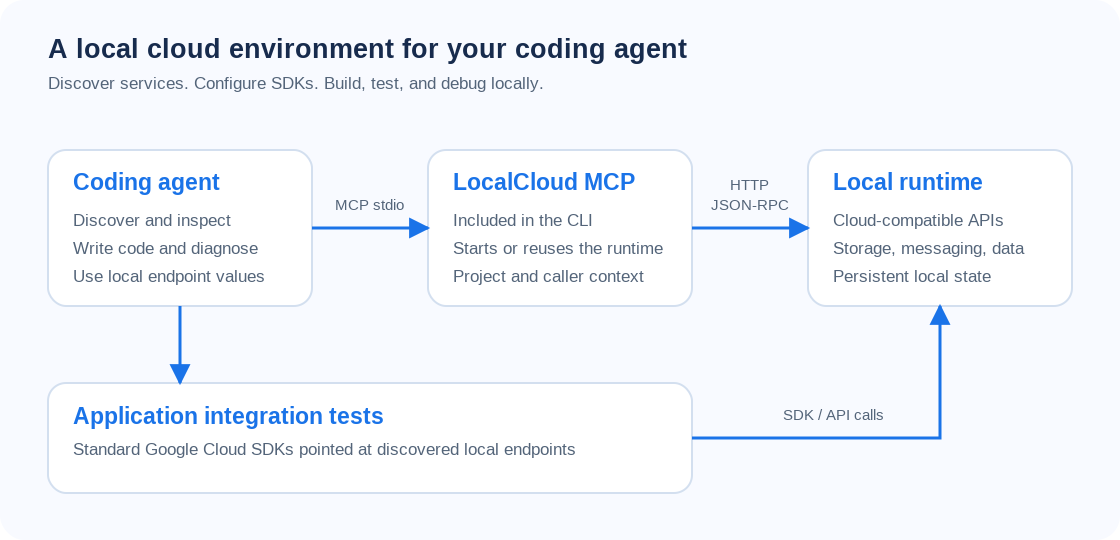
Coding agents need to run the integrations they write. LocalCloud gives Google Cloud applications local service APIs for that feedback loop: write code, run tests, inspect failures, and verify fixes. MCP supplies service discovery, SDK settings, and diagnostics; application tests exercise the local runtime.
Why agents need cloud feedback
A coding agent can generate a Pub/Sub consumer and a test that mocks its SDK calls. Running that code against a service adds another check: can it create resources, publish and receive the expected payload, and produce the application's expected output? Compilation and mocked tests answer different questions.
On November 11, 2026, AWS released AWS Emulator. GeekWire covered the launch, and AWS's engineering explanation describes putting infrastructure inside the agent's write, run, and inspect loop. Its construction workflow also uses tests checked against real AWS to evaluate the emulator.
For Google Cloud applications, LocalCloud gives agents local dependencies to exercise through standard SDKs. The agent can create test resources, inspect an actual response, and rerun an assertion while changing the application. Local endpoints also let that iteration happen without granting access to a real cloud project or incurring cloud-resource charges.
Give the agent both an environment and an acceptance condition. The useful result is a test command and an observed outcome that you can review. Keep repeatable test data and test-owned cleanup in the loop; use real Google Cloud separately for release validation.
Install and connect
Install LocalCloud CLI 0.1.9 or newer and have Docker running. Use runtime 0.1.5 or newer, which strict MCP clients require. On macOS, or Linux with Homebrew:
brew install LocalGCloud/tap/localcloud
lc --version
lc doctor
lc mcp install --client cursor
Reload Cursor and enable localcloud. The bridge starts or reuses your local runtime automatically. The client guide also covers Claude Code/Desktop, Codex, VS Code, Cline, Gemini CLI, Antigravity, and Windsurf, plus installation without Homebrew.
Give the agent a task
Ask for a small test with observable results, including the application's behavior after the SDK call. For a Pub/Sub producer and consumer:
Read https://local.cloud/ai/agents.md and inspect this repository's Google Cloud SDK clients and tests.
Use LocalCloud MCP to list local services, check readiness and compatibility, and obtain SDK settings.
Write a small Pub/Sub integration test: create a topic and subscription, publish a known payload,
run the application's consumer, assert its output, and acknowledge the message after successful processing.
Use only the returned local endpoints and uniquely named test resources.
Run the test, inspect any failure, fix the cause, and rerun without weakening the expected result.
Report the test command, failing assertion if any, code change, and final result.
Clean up only resources created by the test. Do not request or use real GCP credentials.
Stop if a required operation is unavailable; do not fall back to real Google Cloud.
The agent starts with localcloud_list_services, localcloud_check_readiness, and localcloud_get_env. Returned SDK settings account for the runtime's actual port mappings, so the test does not guess endpoints or request real cloud credentials.
Three cloud workflows
- Cloud Storage: create a uniquely named bucket, upload a known string, read it back, and check the exact content.
- Pub/Sub: create a topic and subscription, publish a known message, pull and verify its bytes, then acknowledge it.
- BigQuery: run
SELECT 1 AS mcp_smokeand check that the result contains exactly one row with value 1.
These assertions exercise application behavior through standard Google Cloud SDKs. The example removes its own bucket, topic, and subscription in cleanup. Read the workflow guide for individual agent prompts.
Run the example
Start an independent runtime for the three services. Dynamic ports allow it to run beside your everyday environment:
lc start --image agentcloud/localcloud:0.1.5 \
  --data-volume localcloud-mcp-demo \
  --services gcs,pubsub,bigquery --local-only --accept-dynamic-ports
From the public CLI repository, run the example with its optional Python SDK dependencies using uv:
git clone https://github.com/LocalGCloud/localcloud-cli.git
cd localcloud-cli
uv run --with mcp==2.0.0 --with google-cloud-storage \
  --with google-cloud-pubsub --with google-cloud-bigquery \
  examples/mcp_workflows.py --data-volume localcloud-mcp-demo
A successful run looks like this (recorded with CLI 0.1.9 and runtime 0.1.5). Watch the recorded demo on its dedicated video page.
PASS MCP: localcloud_list_services
PASS MCP: localcloud_check_readiness
PASS MCP: localcloud_check_compatibility
PASS MCP: localcloud_get_diagnostics
PASS MCP: SDK configuration validates against its output schema
PASS MCP: BigQuery query returns the expected row
PASS Cloud Storage: upload and read back the exact content
PASS Pub/Sub: publish, pull, verify, and acknowledge
PASS BigQuery: SELECT 1 returns the expected row
Cleanup complete: only uniquely named example resources were removed
When finished, use lc stop --data-volume localcloud-mcp-demo to stop the example runtime. Its named volume remains available for reuse.
Diagnose a failure
Give the agent the failing assertion and ask it to inspect readiness, diagnostics, and recent requests before changing the test. A service can be listed in the catalog but not enabled in your runtime, so check readiness first.
If an existing runtime predates 0.1.5, follow the runtime upgrade and troubleshooting instructions. Updating the CLI or installing another client configuration does not replace an existing container.
From failing test to verified fix
Try a controlled failure in a disposable checkout of the runnable example above. In examples/mcp_workflows.py, replace the assertion comparing message.message.data with b"LocalCloud agent message" with this deliberately incorrect text comparison:
assert message.message.data == "LocalCloud agent message", "expected text, received bytes"Run the same example command. The publisher sends the known message, the subscriber pulls it, and the assertion fails. This is the relevant line from the captured traceback:
AssertionError: expected text, received bytesThe Python SDK returns the payload as bytes. A mock returning text could hide that mismatch. An agent can inspect the received value and decode it at the consumer boundary while keeping the expected text unchanged:
assert message.message.data.decode("utf-8") == "LocalCloud agent message"Rerun the example. The corrected assertion verifies the received content, then the subscriber acknowledges the message. The captured run continues through BigQuery and cleanup:
PASS Pub/Sub: publish, pull, verify, and acknowledge
PASS BigQuery: SELECT 1 returns the expected row
Cleanup complete: only uniquely named example resources were removed
This controlled exercise was rerun on November 11, 2026 with CLI 0.1.14, Python google-cloud-pubsub 2.39.1, and a local Linux ARM64 runtime image whose ID begins sha256:86574e8557a0. It demonstrates one SDK payload boundary. Apply the same process to a real application failure: preserve the acceptance condition, fix the producer or consumer, and rerun the integration test.
Local data and production
The workflows above were run with the published CLI on macOS (Apple Silicon) and the standard Linux ARM64 runtime image. Use local tests throughout development, then validate releases against Google Cloud for production IAM, quotas, managed-service behavior, and scale.
LocalCloud supplies cloud service APIs. Use an appropriate code execution sandbox for the agent's shell and filesystem access; local API endpoints do not provide that isolation.
Use test-owned resources and explicit cleanup. The default data volume is shared; a logical project is not a security boundary between agents. Choose a separate named volume when you need an independent runtime. MCP management writes and destructive actions require explicit runtime permission settings.
MCP setup guide · More SDK examples · CLI source and releases